How it works
Two photos per room, then the app does the typing.
Here is exactly what happens between opening the camera and handing a PDF to your agent, including the parts where the AI asks you for help.
Last updated September 12, 2026
AI Home Inventory turns photographs of rooms into an itemized contents inventory with estimated replacement costs. The whole job for a three-bedroom house is 25 to 30 photos and about an hour, most of it walking between rooms. The four steps below are the same four the app shows on screen.
1. Photograph the room
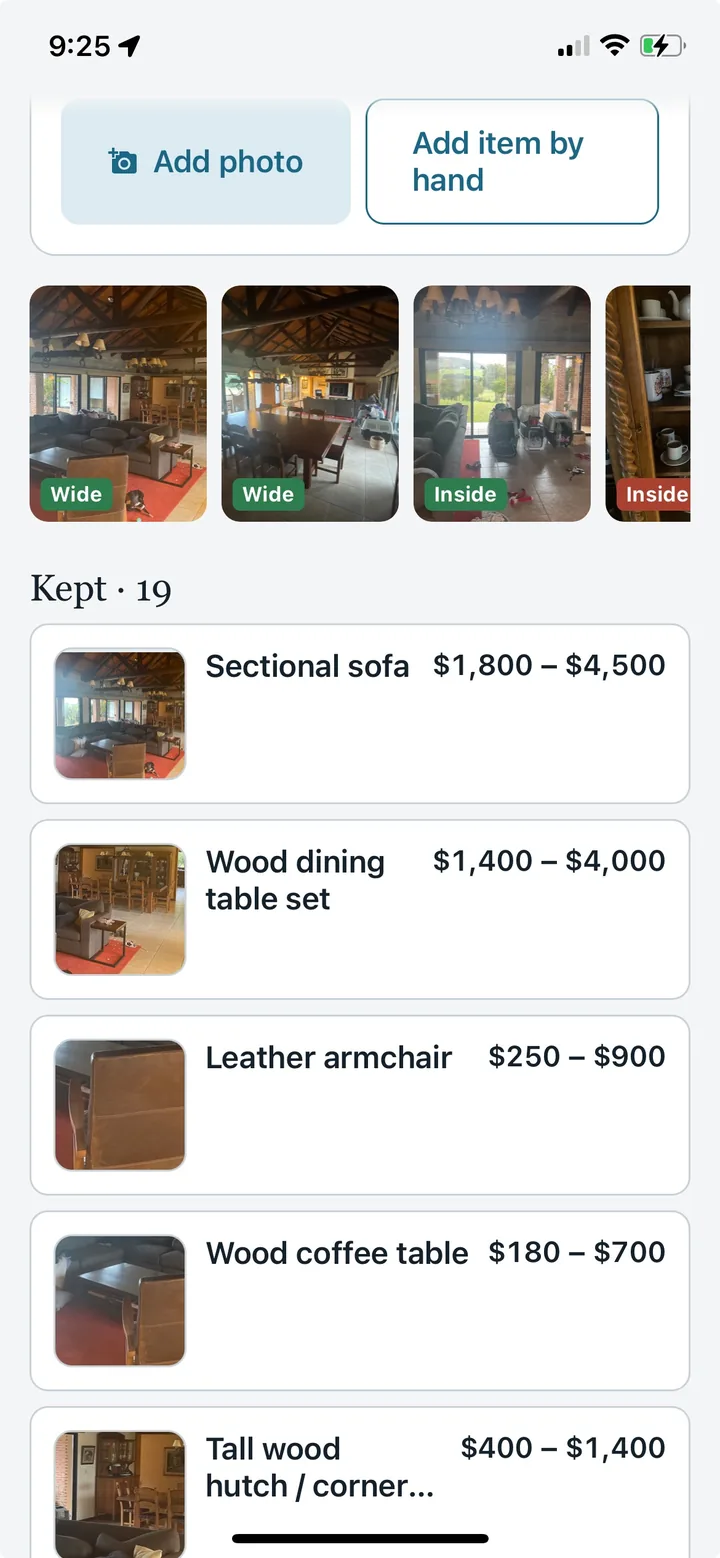
Two shots back to back: from the doorway, then from the opposite corner. The app tells you where to stand and takes both before it lists anything.
Bathrooms, closets and storage spaces get one shot. Everything else gets two, because the second angle catches what the first hid behind the sofa and lets the app merge duplicates instead of listing the same table twice. You can use a photo already on your phone instead of the camera.
2. The AI lists what it sees
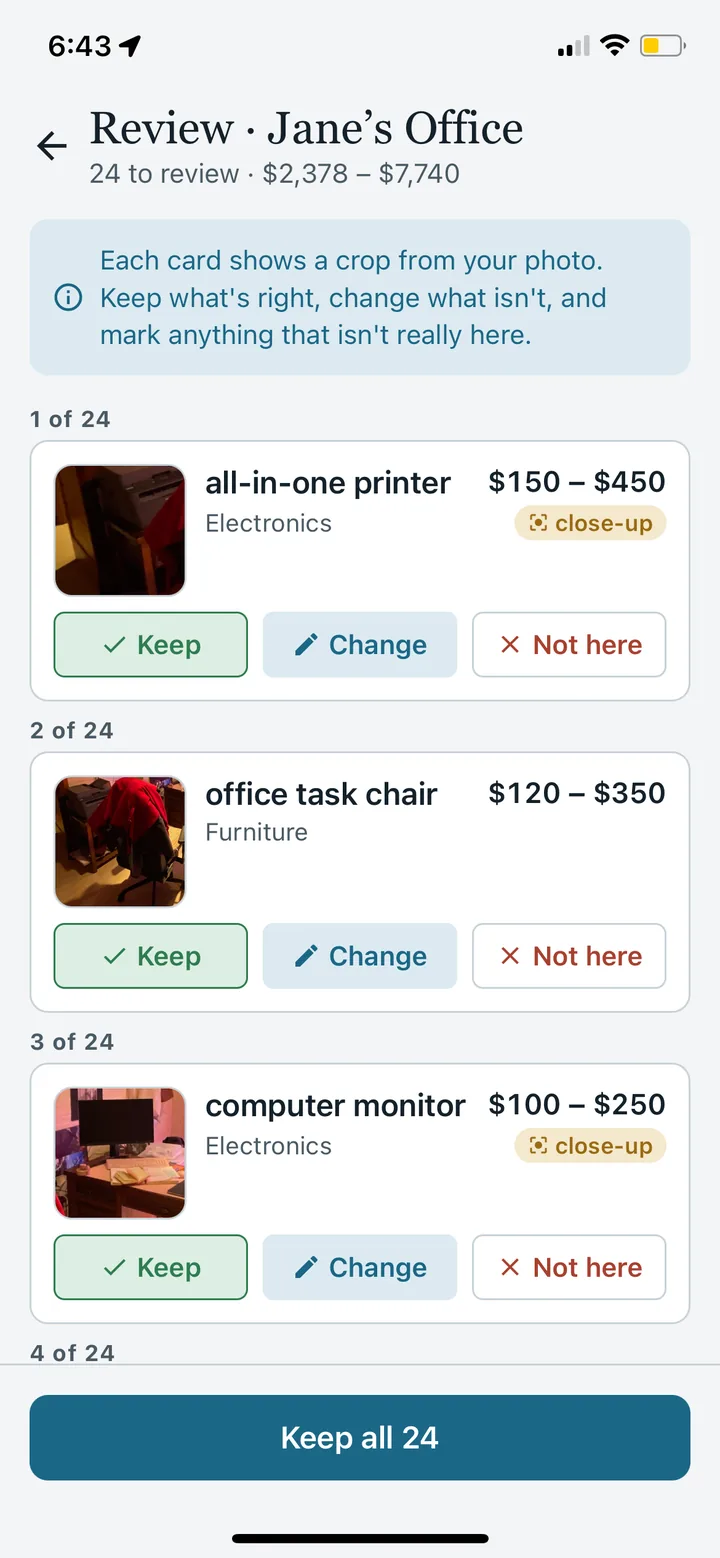
Both photos are read together and merged into one list. Each item card shows a zoomed crop of the object, a name, a quantity, and an estimated replacement-cost range.
Each card carries the quality cues the estimate used, for example “solid wood, mid-size, visible wear”, so you can correct the premise rather than argue with the number. Grouped items such as “paperback books, about 40” are priced as one line. Parts of the building, such as built-in cabinets and the air conditioner on the wall, are excluded because they are covered as the dwelling, not as contents.
3. Keep, remove, close-up
Swipe through the cards. Anything valuable or unidentifiable gets a request for a close-up of the label or receipt, which can help refine the estimate.
After each wide shot the app also lists what it could not see: a closed closet, the drawers of a dresser, a shelf too far away. Each becomes a suggested photo. Tap one, shoot it, and the contents are added to the same room. The app suggests; it never blocks. You can finish a room with a single photo if that is all you want.
4. Get the report
A PDF with photos, every item, and a total to hold against your policy's contents limit. CSV too. Send it to your agent from the share sheet.
The report lists every item with its photo crop, the range or the value you entered, and a high-value schedule of anything over $500, which is what to ask your agent about a rider for. Items still waiting on a close-up are marked, so you can send the report today and update it next month.
What a “close-up” is and why the app asks for it
In a premium room a wide shot underestimates. Testing on a home office found the genuine designer chair priced as a reproduction, the camera on the tripod missed entirely, and the studio microphones priced at a fraction of retail. That is the expected failure mode of a wide photograph, and it is why close-ups are first-class rather than optional. When you photograph the label under the chair or the model plate on the back of the monitor, the value becomes a lookup instead of a guess and the estimate is replaced.
The app flags an item for a close-up when it values it above $500 at the high end, when it is electronics without a legible model, or when a design resembles a well-known premium brand. Jewelry, watches, art, antiques and collectibles are never priced from a photo at all. They are marked “needs appraisal” and you enter the figure from the appraisal or receipt.
Where the inventory lives
Photos and items are stored with your account, not only on the phone, because the phone is usually in the same fire, flood or burglary as the house. You can use the app without an account; add your email when you want the inventory to come back on a new phone. Deleting the account deletes every photo and item.
What it costs
Try 4 AI photos total, shared across your first 2 rooms. Whole Home is a one-time US$49.99 and includes unlimited rooms, 60 AI photos, unlimited close-ups, the PDF and CSV reports, and the annual re-scan reminder. Packs of 20 more photos cost US$9.99. There is no subscription. Details on the pricing page.
Questions
What is AI Home Inventory?
AI Home Inventory is a home inventory app for iPhone and Android. It suggests items from room photos, lets you review and correct them, and keeps the inventory available on the web. Whole Home adds PDF and CSV exports.
Can I try it before paying?
Yes. Start with 4 free AI photos across 2 rooms and review the suggested items in the app. Whole Home is US$49.99 once and includes 60 AI photos plus PDF and CSV exports. Extra 20-photo packs cost US$9.99.
How many photos does a room need?
Start with two wide shots from different corners. Review the suggestions, then add photos of open cabinets, drawers, labels and hidden items as needed. The number of photos depends on the room and its contents.
Does AI identify everything or provide an appraisal?
No. It suggests visible items and estimated replacement-cost ranges. It can miss or misidentify objects, and a photo cannot establish authenticity, ownership or insurance coverage. Correct the list and add receipts, serial numbers or appraisals where appropriate.
Can I use the report for insurance?
You can share a Whole Home PDF or CSV with your insurer as part of your records. Acceptance and claim requirements depend on the insurer and policy. Keep supporting photos, receipts and appraisals; the app does not determine a claim payment.
Does it work for renters?
Yes. Renters can document their own belongings room by room. Check the personal-property coverage and limits in your policy; an inventory is a record of possessions, not an insurance policy.
What happens to my photos?
Photos are processed by AI to suggest items and stored with your account. You can review your inventory on the web and delete your account in the app. See the privacy policy for processing, storage and deletion details.
Try it on the room you're in.
4 AI photos free across 2 rooms. Two photos and about twenty seconds each.


4 AI photos free across 2 rooms. No credit card, no subscription.
What to do next
- Keep the checklist beside you
Use it while photographing rooms and reviewing items.
- Review PDF and CSV export options
Choose the plan that fits the record you need.